Tripsy 3.10.7 - Beyond Description


As always, the team have been hard at work on improving Tripsy with tweaks and fixes for the issues both we and you as our users have found and reported.
Before we describe the biggest change in this release, let's look at some of the smaller, but equally as important, changes:
- We've improved how Tripsy looks on iPhone Duo with tweaked layouts, landscape map interaction, trip cards, and review prompts.
- We've smoothed out Smart Import transitions, made trip starting soon notifications clearer, and more made sure you'll see more consistent guest avatars.
- There's also improved sign-out reliability and import security, plus additional stability fixes to make sure
The biggest change is something that needs a bit more description, and if you haven't already gotten the subtle hints it's all about the description field for every activity.
This is distinct from the notes for an activity that you've been able to use to add notes about the activity, like any additional parts of a booking, or WiFi codes for your hotel.
We found that a lot of AI tools weren't taking the hint about the notes field and were putting descriptions about the activities they created into the description instead, which whilst it would show up in your activities couldn't be changed within Tripsy itself and so that, until now, was only editable when using our MCP server with AI tools, our API, or our CLI tools.
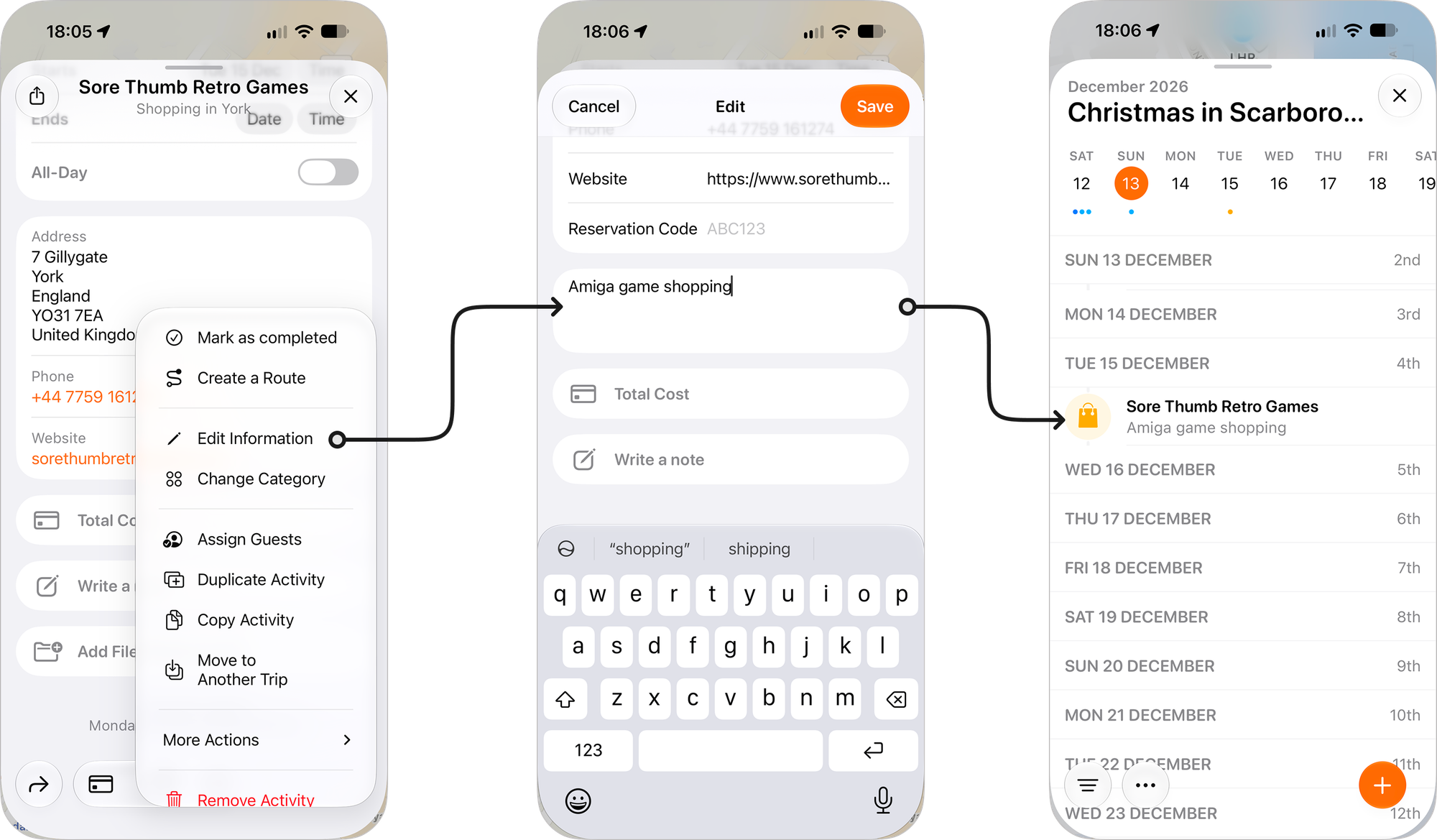
The description field shows up in two places when you've added something to it - in the activity itself, and also it replaces the address line on the itinerary when present.
This is great if you want to add more details to a particular shop, add the play you're going to see at the theatre, or maybe a specific type of dining (e.g. an afternoon tea).
To edit the description field for an activity:
- Open the activity in question
- Tap on the more actions menu (three dots) and choose Edit Information
- You'll see the Description field and you can add the text you desire here
We hope you'll find this additional field helpful, even if you're just editing what your AI tools added to the activity for you.
Tripsy 3.10.7 is available in the App Store now, and in most cases should be an automatic update.
As always, if you have any questions or comments, we'd love to hear from you and the best way to do so is via Settings > Talk to Us from within Tripsy.