
MCP Power Up: Documents & Emails

We launched our MCP server earlier this year to allow you to optionally connect your choice of AI tools to your Tripsy account to let you do more with your trips and activities.
It's fair to say that this has become one of our most popular features, and even better, it's free for everyone to use!
With our latest update, version 2.0, the MCP server gets new powers for our PRO customers, as you can now work with your documents and forwarded emails directly through your connected AI tools.
So... what can you do with these new powers? Let's take a look!
Documents
When we talk about documents in Trispy, we mean anything that can be attached to an activity, that could be a PDF document, a screenshot, a Word file, or almost any file you may want to add at both the trip level and for specific activities - for example your theatre tickets, or trip
Let's look at a practical example:
You've purchased your annual multi-trip travel cover for the next year and just downloaded the policy document. You can now tell your AI tool to take that document, upload it to Tripsy, and attach it as a trip document for all your trips that end before the policy expires.
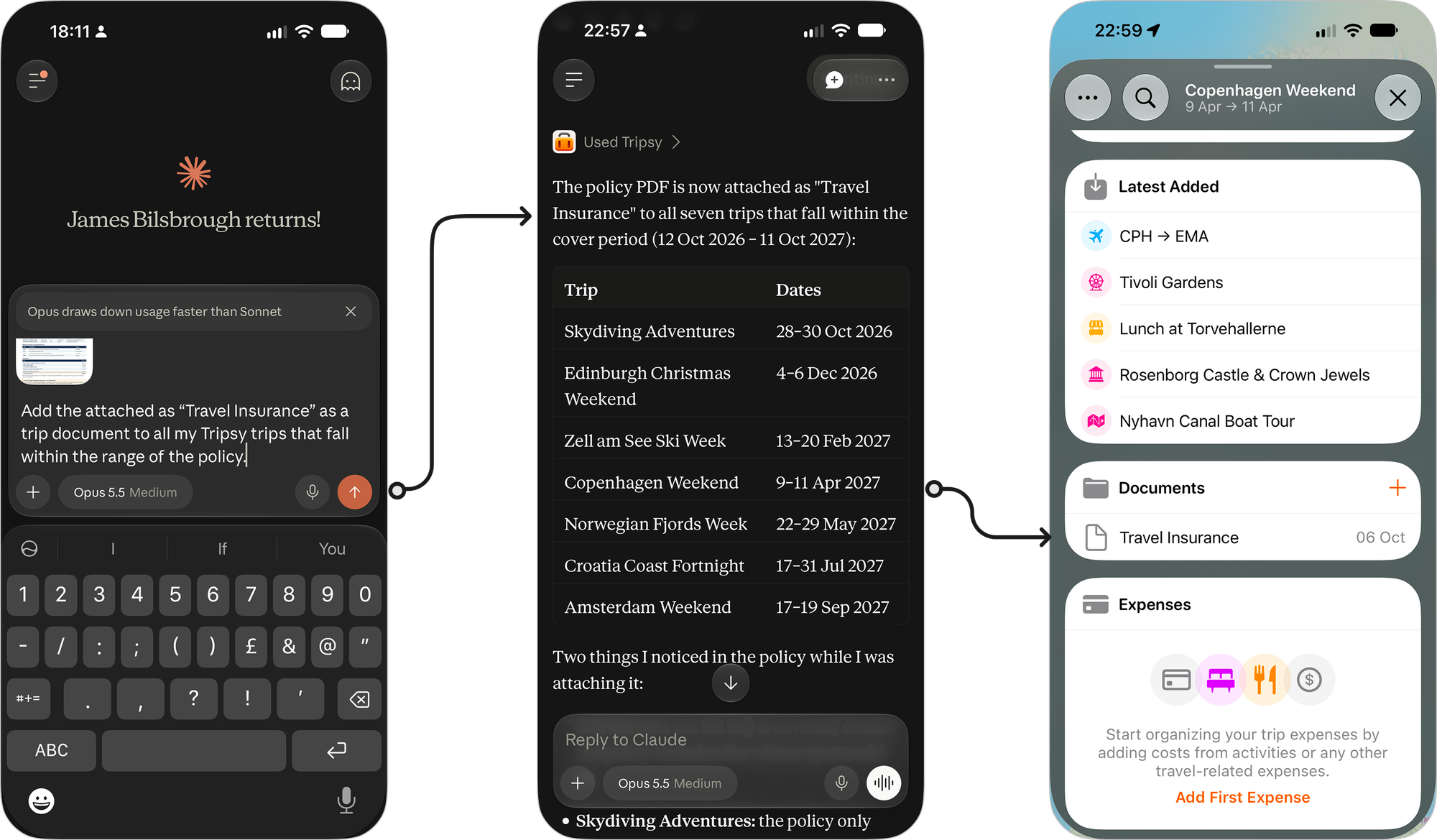
You're looking forward to your weekend in Copenhagen , but you're taken ill and can't make it - you've recovered but now have the usual nightmare of claiming on your travel insurance.
Don’t worry, you can ask your AI tool to find all the documents relating to that trip, and the original email confirmations, as well as the travel insurance policy, and get them all in one place to submit your insurance claim— you could even have your tool draft the heartstring-pulling claim form for you!
Automate All The Documents!
Of course, because you can usually connect multiple services to your AI tools, you could also do some very clever things with automation (e.g. Claude's Cowork) to watch a cloud folder (e.g. on OneDrive, Dropbox, or Box) for new documents and attach those to the right trips.
So, as you can see, you've now got the power to query any existing documents in your trips, add new ones to trips and activities, and connect all of this together for automation and problem solving.
Forwarded Emails
When you forward emails to Tripsy, we'll try our best to turn those into activities for you, and this works really well with common reservation emails from airlines, hotels, bookings made with restaurants that use well-known platforms, etc.
There will, whilst we're working hard to avoid this happening, be times when these can't be parsed and these emails will still get added into your Tripsy account; they just won't be associated with a particular activity.
With this update, you can now leverage the power of your AI tools to analyze those failed emails and turn them into activities.
The MCP server can now see all of the forwarded emails in your account and can tell if there's any that haven't been assigned to an activity as well as being able to see all of the attachments in those emails.
Let's take a look at another practical example of how this can help:
- You've received your personalised itinerary from your boutique travel agent, and you forward the email with the Word document to Tripsy.
- The email parsing can't turn this into activities, as everything is in the attachment and not the confirmation email, which is one of the most common reasons emails can't be parsed, especially from 'smaller' travel providers.
- You ask your AI agent to find the last email you received from the 'Bluth Travel Company' and turn the attached Word document into your next trip and attach the file as a trip document once everything has been created.
The Technical Details
I'm sure many of you are wondering what new tools we've added to make this all possible. So, here's a breakdown of the new read and write tools we've added:
Document Tools
Documents can be attached to a trip or an activity (e.g. acommodation, transport, or any other type of activity). The new tools cover both retrieving existing documents and managing attachments.
| Read tool | What it does |
|---|---|
tripsy_documents_list |
Lists all documents across a trip, or those attached to a specific itinerary item, automatically retrieving every page of results. |
tripsy_documents_show |
Retrieves a document’s metadata, including its title, description, and file type. |
tripsy_documents_get |
Returns a temporary private download URL and its expiry time, or the original URL for a linked document. |
| Write tool | What it does |
|---|---|
tripsy_documents_upload |
Uploads and attaches a file in one call using base64-encoded content, supporting files up to 8 MiB. |
tripsy_documents_upload_prepare |
Prepares a private upload for files up to 25 MiB, returning a temporary upload URL, the required headers, and an upload token. |
tripsy_documents_attach |
Attaches an HTTP(S) link or completes a prepared file upload. |
tripsy_documents_update |
Updates a document’s title, description, thumbnail, or favicon, or moves it to a different trip or itinerary item. |
tripsy_documents_delete |
Recoverably deletes a document from its specified trip or itinerary item. |
For larger files, the upload flow has three steps: call tripsy_documents_upload_prepare, upload the file bytes to the returned URL using HTTP PUT and the supplied headers, then call tripsy_documents_attach with the returned object_key and upload_token. Preparing an upload alone does not create an attachment.
To target a specific itinerary item, document tools use trip_id, parent_type, and parent_id. The supported parent types are trip, activity, hosting (accommodation), and transportation; trip-level attachments do not need a parent_id. See our document API documentation for the underlying routes and attachment behaviour.
Forwarded Email Tools
There are two sets of email tools: one for original booking emails already attached to your itinerary, and another for forwarded emails awaiting manual review.
| Read tool | What it does |
|---|---|
tripsy_emails_list |
Lists booking emails across a trip or for a specific itinerary item, automatically retrieving every page of results. |
tripsy_emails_show |
Retrieves an original booking email, including its stored content and attachments. |
tripsy_inbox_list |
Lists forwarded emails that have not been successfully parsed and are still awaiting manual review. |
tripsy_inbox_show |
Retrieves an inbox email’s full details, including its body and attachment metadata. |
| Write tool | What it does |
|---|---|
tripsy_inbox_update |
Changes an email’s subject or moves it to a trip, activity, accommodation, or transportation. |
tripsy_inbox_delete |
Recoverably deletes a forwarded email owned by the authenticated user. |
An AI tool can read an unprocessed email, extract the reservation details, create the appropriate itinerary items using the existing Tripsy tools, and then associate the original email with its destination using tripsy_inbox_update.
Each move accepts exactly one destination and removes the email from the manual-review inbox.
The email and inbox API documentation explains these workflows in more detail.
Access and Permissions
Document and attached booking-email access follows how your Tripsy account can access documents and forwarded emails.
- Trip owners need an active Tripsy PRO subscription or our Lifetime PRO unlock.
- Collaborators can access these features without their own PRO subscription for trips where the trip owner has Tripsy PRO and when their trip permissions allow it.
- Only forwarded emails that have been attached to an activity can be accessed by collaborators, inbox emails are visible only to the account owner.
- Reading requires document viewing permissions, while uploads and changes also require edit permission. File download URLs are temporary, and access is checked before they are issued. See the document access requirements.
Making the Most of the MCP
As we continue to add more features to the MCP server and work with the major AI platforms to get Tripsy added as an official connector/plugin, we want to help you discover what it can do for you and your trip.
Over the coming weeks and months, we'll be posting a series of posts here on the blog to showcase some of the ways you can use your AI tools to power up your trips whilst still having the same beautiful view of your trips within Tripsy.
Of course, we know not everyone will want to use third-party AI tools for varying reasons, and it's for that reason that we do offer a self-hosted MCP server that you can connect to your local LLMs, etc.; these new powers also extend to our API for you to use with your own creations.
As a final aside, if anyone gets the little callback in this section's name to a TV show from the 1980s in the UK, do ping us on our socials!