
Plan smarter trips with Tripsy and Claude or ChatGPT


Travel planning is full of small decisions: what to do, when to do it, how to group activities, how much time to leave between places, and what to change when plans inevitably shift.
Tripsy already gives you one place to organize flights, stays, activities, expenses, and documents. Now, with Tripsy’s new MCP integration, you can plan and adjust your trips through natural conversation using AI tools like Claude, ChatGPT, Cursor, and Codex.
Instead of tapping through menus or manually reorganizing your itinerary, you can simply ask your AI assistant.
“Reorganize my Tokyo trip by neighborhood to minimize travel time.”
The assistant can understand the request, look at your Tripsy itinerary through MCP, and help turn scattered plans into something easier to follow: Shibuya and Harajuku together, Asakusa on another day, Shinjuku when it makes sense.
The goal is simple: less friction, better trips.
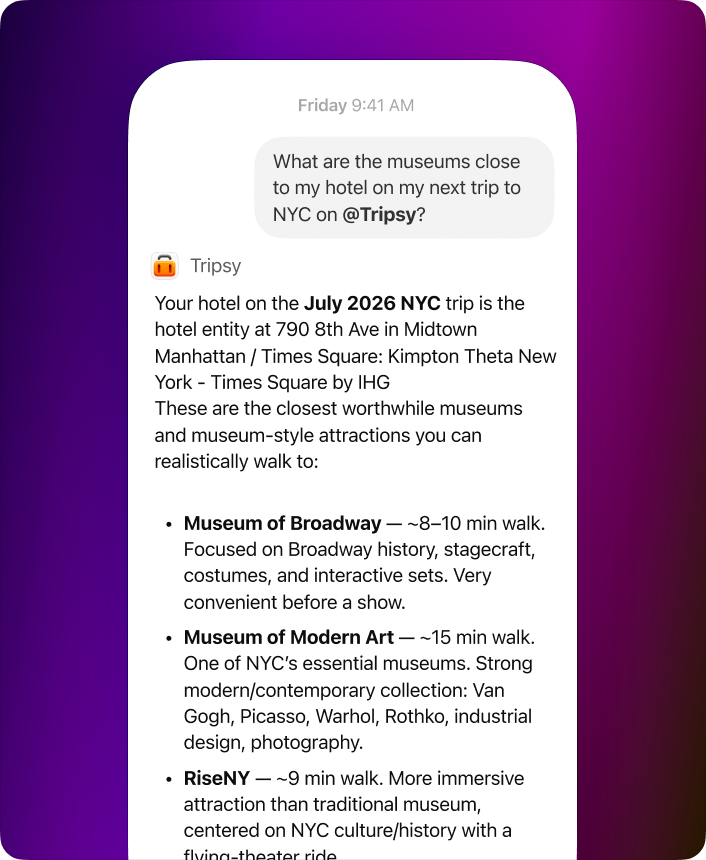
What you can do with Tripsy and MCP-compatible AI tools
With Tripsy connected through MCP, trip planning becomes conversational and far more flexible.
You can ask your AI assistant to reorganize activities by time, location, or personal preference. If your itinerary is too packed, it can help spread things out. If you have activities scattered across a city, it can group them by neighborhood to reduce travel time.
You can also add activities instantly. Tell the assistant what you want: museums, hikes, restaurants, local experiences, parks, nightlife, or something more specific. It can suggest relevant options and add them directly to your Tripsy trip.
Existing itineraries are easy to update, too. Change dates, swap activities, adjust timing, or rethink an entire day without manually editing every detail.
And if you are starting from scratch, the assistant can help create a full trip. Give it a destination, dates, and interests, and it can build an itinerary with activities and practical timing.
Because the integration uses MCP, the AI is working with structured Tripsy data instead of guessing from plain text.
Real ways to use it
Here are a few examples of what this makes possible.
If your Tokyo trip has museum visits in Shibuya, dinner in Shinjuku, temples in Asakusa, and shopping in Harajuku, ask the assistant to reorganize everything by location.
If you are going to Barcelona and want something beyond the usual tourist list, ask for authentic tapas bars, lesser-known parks, and street art neighborhoods.
If you only know that you want five days in Bali with beaches, yoga, and local food, the assistant can help build the structure of the trip from scratch.
If a flight delay changes your first day, ask what to remove, what to move, and what can be added later.
If your mood changes mid-trip, ask for something more adventurous nearby or a slower alternative for the afternoon.
And if you are planning for a group, the assistant can help balance different interests across the itinerary: adventure, culture, restaurants, nightlife, and downtime.
Why MCP matters
MCP (Model Context Protocol) gives AI tools a structured way to interact with apps like Tripsy.
Instead of relying only on pasted text or screenshots, AI assistants can securely access your actual trip structure: activities, transportation, stays, expenses, collaborators, and trip metadata.
That means the assistant can:
- Read and understand your itinerary
- Create or update activities
- Adjust schedules intelligently
- Track transportation and lodging details
- Help reorganize plans dynamically
- Work with your existing Tripsy data in real time
This makes AI travel planning much more reliable and practical than generic chat alone.
Works with Claude, ChatGPT, Cursor, Codex, and other MCP clients
Tripsy’s MCP server is not limited to one AI platform.
You can connect Tripsy to any tool that supports MCP, including:
That means you can manage and plan trips from the AI environment you already prefer, whether that is a chat interface, IDE, terminal workflow, or automation setup.
How to connect Tripsy through MCP
Connecting Tripsy is optional. Tripsy works normally without any AI integration, and you can continue planning trips directly in the app as usual.
For users who want conversational planning, setup takes less than a minute.
MCP server URL
https://mcp.tripsy.app
General setup flow
- Open your MCP-compatible AI client.
- Add a new MCP server or connector.
- Use the Tripsy MCP server URL:
https://mcp.tripsy.app - Sign in with your Tripsy account.
- Authorize access.
- Start asking questions about your trips, activities, flights, stays, and expenses.
After login, you must explicitly approve the connection before any AI tool can access your Tripsy data.
You stay in control, and the integration only works after authorization.
For more information, check our guide here: https://tripsy.app/claude
Example prompts
Here are a few prompts you can try immediately:
Reorganize my Kyoto itinerary to minimize transit time.
Add three highly rated ramen restaurants near my hotel in Tokyo.
Move outdoor activities to the days with better weather.
Create a five-day itinerary for Barcelona focused on architecture, food, and nightlife.
My flight arrives six hours late. What should I move to another day?
Balance this trip for two people: one prefers museums and the other prefers hiking.
For power users: Tripsy CLI and automation workflows
Alongside the MCP integration, Tripsy also provides a CLI for terminal workflows and automation.
With the CLI, you can:
- Authenticate accounts
- Inspect trips and itineraries
- Create and manage activities
- Upload documents and files
- Access supported API routes
- Automate travel workflows from scripts or terminals
Tripsy’s MCP tools also expose structured capabilities for AI assistants, including:
- Trip creation and updates
- Activity management
- Lodging and transportation management
- Expense tracking
- Collaborator access
- User profile management
- Raw API access for advanced workflows
That means AI tools can work with Tripsy through a real structured tool layer instead of loosely interpreting text.
A more natural way to plan trips
Travel plans are not static. They change with weather, delays, energy, budget, group preferences, and whatever you discover along the way.
Tripsy’s MCP integration is built for that reality.
Instead of constantly reorganizing your itinerary manually, you can iterate through conversation:
Ask. Adjust. Review. Continue.
It feels less like managing a database and more like planning the trip with an assistant that actually understands your itinerary structure.